17 Jun 2026

Dhaval Gajjar
17 Jun 2026
Dhaval Gajjar
Some text messages are so important that you need to send them again and again. However, that does not mean you need to do extra work for it. You can simply schedule and send recurring text messages instead.
In this blog, we will explore what a recurring text message is, how to send recurring text messages, its use cases, and how it can benefit your business.
Recurring text messages are automated text messages that go out on a repeating schedule, like daily, weekly, monthly, or any interval of your choice. You create the message once, and the SMS marketing platform sends it automatically based on your defined schedule.
Some common examples include:
Once you set the message, it is delivered automatically without any manual intervention.
At first glance, both recurring and scheduled text messages sound similar, but they’re different.
Scheduled text messages are one-time text messages. You write the message, schedule it for a specific date/time, and it goes out.
Recurring text messages are repeated text messages. You set the frequency: daily, weekly, or monthly, and messages keep going out on that schedule until you stop them.
Let’s compare them quickly.
| Feature | Scheduled Text Message | Recurring Text Message |
| Sent | Once | Repeatedly |
| Set up | Per message | Set once and run automatically |
| Best for | One-time announcements | Ongoing reminders, campaigns |
| Manual Effort | Every time | Initial setup only |
For example:
Scheduled text messages: Sending a “Happy Birthday” text to a customer tomorrow morning.
Recurring text messages: Sending a “Policy is about to expire” reminder to policyholders on the 1st of every month.
This is a common question most people ask, and the short answer is: No. SMS drip campaigns and recurring text messages are not the same, but they’re related.
Let’s understand how they differ.
Recurring text messages involve sending the same messages to a contact list on a fixed schedule. Everyone on the contact list receives the same message at the same time. It is just like a broadcast-style message.
For example:
A business is sending this week’s deal to all subscribers every Monday at 10 AM.
An SMS drip campaign sends a series of different text messages to each individual contact, which is triggered by a specific action. In an SMS drip campaign, each person moves through the sequence at their own pace.
For example: On Day-1 after signup -> welcome text and Day-3-> followup, Day -7 -> offer.
Want to learn how to set up an SMS drip campaign? Check out our latest step-by-step guide to set up an SMS drip campaign.
| Feature | Recurring Text Messages | SMS Drip Campaigns |
| Message Content | Same message every time | Different messages in a sequence |
| Timing | Fixed schedule, same for everyone | Depends on each contact’s trigger |
| Best for | Promotions, reminders, and broadcasts | Lead nurturing, onboarding, and follow-ups |
| Audience | Entire list at once | Individual contacts |
So, if you’re wondering when to use each one, here is the answer.
You should use an SMS drip campaign if you want to guard an individual contact through a journey, like nurturing a new lead, onboarding a new customer, or re-engaging cold leads.
Use recurring text messages when you want to reach your entire list with the same message at regular intervals, like daily, weekly, monthly, or yearly reminders or shift alerts.
Some businesses use both. Recurring texts keep your existing audience engaged, while drip campaigns convert and retain individual contacts. Together, recurring SMS and drip SMS cover the full customer lifecycle.
When you use recurring text messages, you don’t need to send messages manually to customers as long as they remain subscribed.
This one is the most obvious benefit. Once you set it up, it runs automatically. You don’t need to copy and paste the same text message every week or remind yourself to send it. It is ideal for small teams that wear multiple hats. Automation saves time and lets them focus on other valuable tasks.
Consistency helps you build trust. When customers expect a message from you, and you always show up, they trust your brand more. Recurring texts help you build that consistency because the schedule is already set.
Text messages have a 98% open rate, and most people read texts within 3 minutes. If you’re running a weekly flash sale or monthly loyalty reward, recurring texts keep your audience engaged without any extra effort.
No-shows, missed appointment reminders, overdue payment alerts, and subscription renewal alerts are not just inconveniences; they cost your business money. Recurring text messages ensure you never miss sending important reminders.
Manually sending messages to thousands of customers is not practical, but automated recurring campaigns can handle it with ease. SMS automation lets you scale your outreach without scaling your system.
Need to know more? Check this SMS automation overview. Also, this SMS marketing playbook covers everything you need to know about text message automation.
Here is the step-by-step procedure to send recurring text messages using Textdrip.
1. Log in to Textdrip. If you have not created a Textdrip account, create one first.
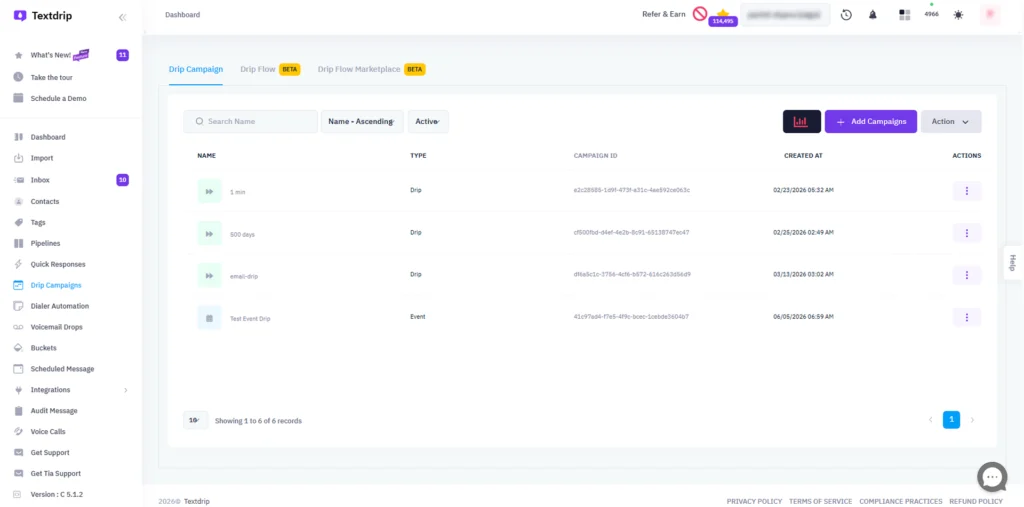
2. Click on Drip Campaign -> Add Campaign.
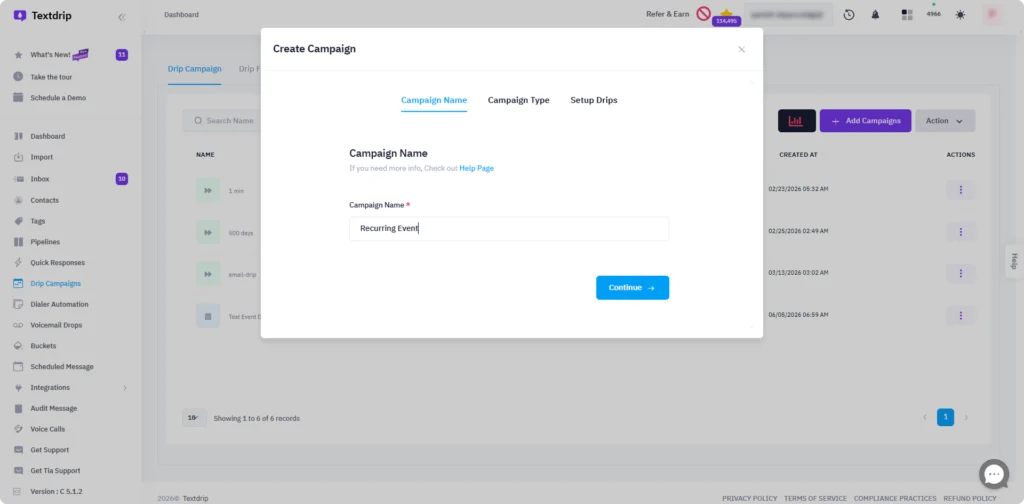
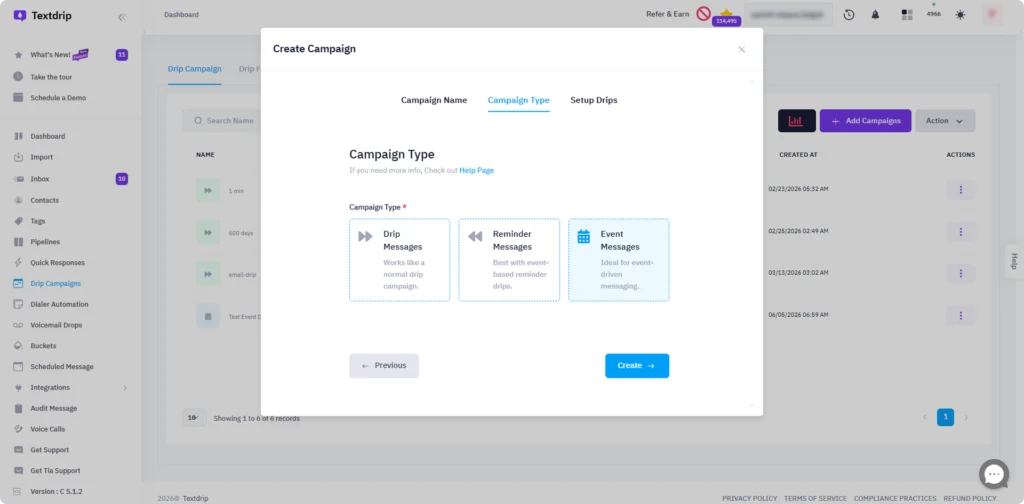
Write campaign name, set campaign type, and choose event drips.
3. Now, craft a message.
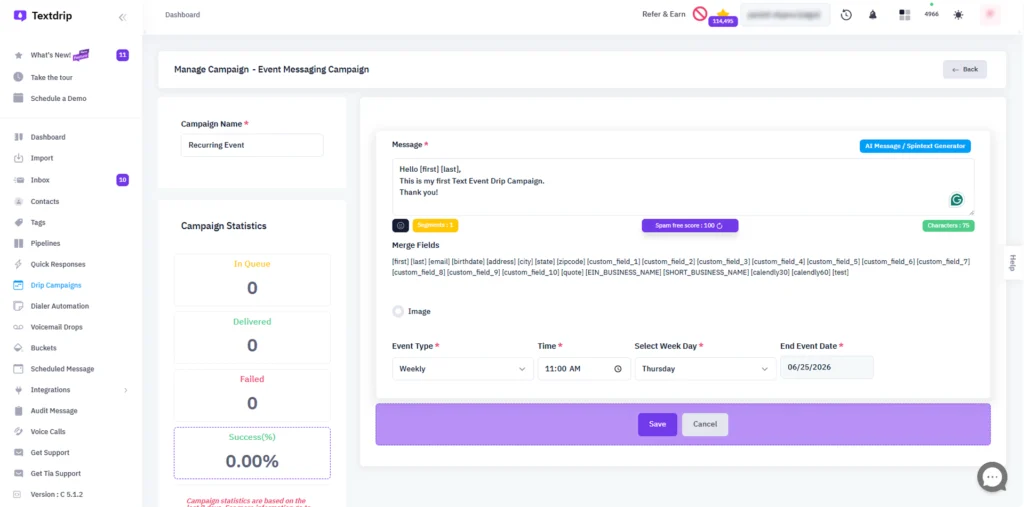
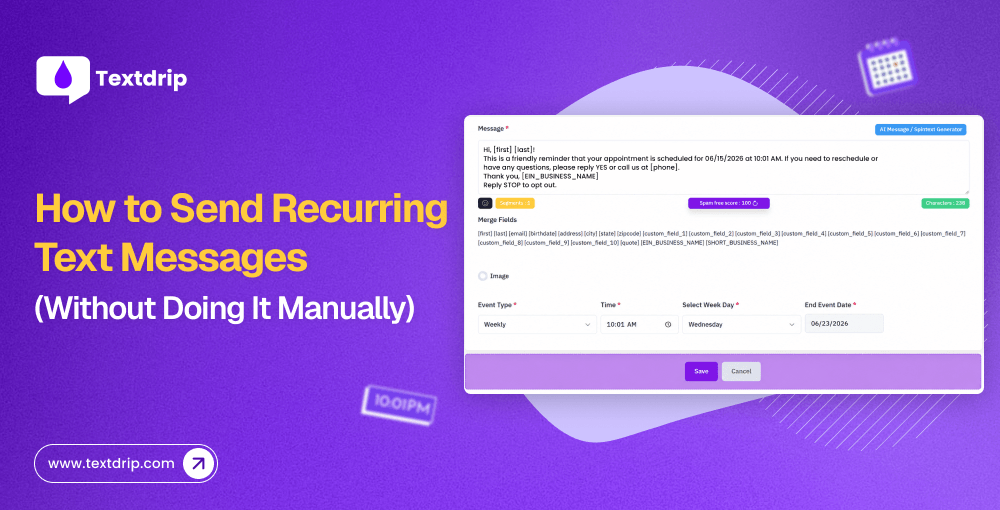
After crafting a message, set the event type, time, days, and end event date. You can set it daily, weekly, monthly, or yearly, based on your requirement. Then click the Save button.
Here are some of the most effective ways you can use recurring text messages for your business.
Healthcare providers, salons, gyms, and home service businesses can use recurring text messages to remind customers of upcoming appointments. It cuts no-shows more effectively. Service businesses can schedule semi-annual service reminders for maintenance or other routine services.
Many businesses use recurring text messages to send payment and invoice reminders. They can send monthly rent reminders, credit card reminders, or other recurring payment requests through automated reminders. This works best for subscription-based businesses and B2B service providers.
You can set up recurring messages to remind employees to check their schedules when ready. Recurring reminders about training sessions can also be scheduled.
You can set recurring text messages for holiday greetings to send to your contacts each year. Examples include birthday greetings, holiday-specific deals, promotions for holiday-themed products or services, holiday gift guides or bundles, or sending last-minute holiday reminders.
If you offer a subscription-based service, you can set recurring SMS reminders to notify your customers about upcoming renewals. These can be sent annually, quarterly, or weekly. This practice can help increase customer satisfaction.
Retailers and eCommerce brands can send weekly deal alerts to their subscribers using recurring text messages.
Recurring text messages work well, but only when done right. Here are a few best practices to keep in mind to ensure your recurring text message always reaches the right people.
Manually sending the same message over and over is a slow, time-consuming, and tedious task. At scale, it becomes impossible for businesses to stay consistent. Recurring text messages solve this issue. All you need to do is set it once, define your schedule, and your messages go out automatically to the right person at the right time every time. This helps you keep customers continuously connected to your business.
Whether you want to schedule recurring text messages for weekly promotions, monthly reminders, or daily check-ins, Textdrip makes it easy with its event drip feature, without any manual hassle.
Start your first recurring campaign today and see the difference automation can make for your business.
The iPhone’s default Messages app doesn’t natively support recurring texts. You need a third-party SMS automation tool, such as Textdrip, to set up and send recurring messages automatically.
Sign up for an SMS automation platform like Textdrip, create your message, and set a repeating schedule, daily, weekly, or monthly. The tool handles the sending automatically after that.
Yes, it’s legal, but only if your customers have explicitly opted in to receive texts from you. Always include an opt-out option like “Reply STOP to unsubscribe” to stay compliant.
The cost depends on the platform and the number of messages you send. Most SMS tools, including Textdrip, offer tiered pricing plans based on your message volume and contact list size.

As the CTO of Textdrip, Dhaval leads the product development team. Being a developer himself, he’s a passionate engineer and… Read More
09 Jun 2026

Philip Portman
08 Jun 2026

TJ Gaushas
28 Jul 2025
TJ Gaushas
04 Oct 2024
TJ Gaushas

As the CTO of Textdrip, Dhaval leads the product development team. Being a developer himself, he’s a passionate engineer and… Read More