18 Jun 2026

Nicole Esters
18 Jun 2026
Nicole Esters
These days, the world is becoming more digitally connected. Texting, which was primarily used for casual communication, has evolved into an essential channel for emergency situations.
In an ideal world, you won’t face any situation where you need to text 911. However, an emergency can occur at any time, so it’s best if you are prepared.
Calling 911 is the best way to contact emergency services, but what if you are in a situation where you can’t talk loudly? Or if speaking on the phone could put you in a more dangerous situation. You might also be speech-impaired or deaf.
To address these challenges, the US rolled out its Text-To-911 campaign on May 15, 2014. So, if you’re wondering, can you text 911? The simple answer to this is YES, but not everywhere in the US.
Read this blog to understand when, why, and how to text 911.
Text-to-911 is a special program that lets people send text messages to emergency call centers when calling 911 is not possible or safe. When you send a text to 911, your message is forwarded to the appropriate emergency call center. Where trained professionals assess the situation and coordinate an appropriate response.
Texting 911 is useful, but it is not available in all areas. Also, users should provide as much detailed information as possible to help authorities respond quickly and effectively.
Yes, in many locations you can text 911 for emergency assistance. However, there are some areas where this service is not yet available. Individual call centers can decide whether or not to implement and deploy text-to-911 technology.
Calling is the fastest and most reliable way to get emergency help, but you should use Text-to-911 if:
You should include your exact location, emergency type, and whether you need police, fire, or medical help.
If Text-to-911 is not available in your area and you send a text message, in that case, you will receive the bounce-back message stating your text message was not delivered. In that case, you need to call 911 or find another way to get help.
You need to keep one thing in mind if you want to text 911: you must use your phone’s native SMS app. Texting to 911 is not supported by WhatsApp, Telegram, or any other messaging platform.
As a mobile user, you must be aware of how to send a text message to a new number, and texting 911 is no different. However, if you’re still unsure, follow these step-by-step instructions to reach a dispatcher.
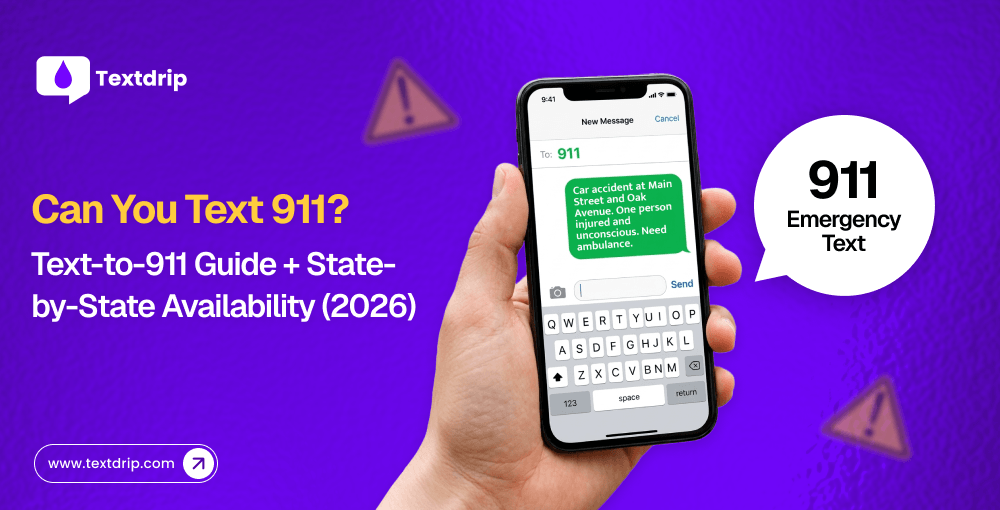
Open your native SMS app, and in the ‘To’ field, type 911. It is the same as typing any new number.
When you’re sending a text message to 911, you must understand one thing: there is someone on the other end who has no idea about your situation. That’s why you need to provide all details about your situation.
You should share as much information as you can, including your location and whether you need an ambulance, fire service, or police as an emergency responder.
The dispatcher may ask you additional questions, so keep your phone active and be ready to answer them. If you’re unsure about an answer, let them know rather than leaving them guessing.
Ensure all the information you’ve included in the text message is correct. It may be possible that in nervousness or shock, you’ve included wrong information. So, double-check the information.
Once you click the send button and make contact with the dispatcher, you can send follow-up texts asking for assistance and guidance if required.
If you’re texting 911, in your first text, you need to include the following information.
Make all information crisp, clear, and concise.
Planning to send a photo or video for some context of the emergency? It looks like a good idea, but 911 is currently capable of receiving only text messages.
If you send a photo or video, it turns your SMS into an MMS, which can’t be received by 911. Want to learn the difference between SMS and MMS? Check our detailed blog on SMS vs MMS.
For example,
50 yo female,
Unconscious,
Ambulance Needed at 850, Mortlake High Street.
Text-to-911 offers several benefits, including accessibility, language support, safety, location accuracy, and much more. Here are some pros of Text-to-911.
Text-to-911 also has some limitations. Individuals should be aware of this and consider it while using Text-to-911.
When you text 911 in a supported area, you will automatically start a conversation over text with a 911 operator.
If you text 911 in an unsupported area, you will receive a bounce-back message indication that your message has failed to deliver. The FCC (Federal Communications Commission) requires carriers to send bounce-back messages in areas where text-to-911 is not supported. It means when you get a bounce-back message, you need to understand that you won’t receive any assistance. So, instead of texting 911, you need to call 911.
There are some states where text-to-911 is available, while in others it is not. Also, some states are in the process of implementing it. Let’s get some information about each.
Few states have successfully implemented Text-to-911. Here are the states that currently support 911 text.
There is only one state that currently doesn’t support Text-to-911: New Mexico. However, as Text-to-911 is more widely adopted nationwide, they’ll also implement it in the near future.
Most countries are in the process of implementing Text-to-911.
Every month, the FCC updates the list of locations that support Text-to-911.
Text-to-911 is an essential communication tool specifically designed for emergency situations. Right now, this service is not available in all US states and regions. So, if you’re wondering, “Can I text 911?”, it is best that you verify whether or not it is available in your area before an emergency occurs.
Cutting-edge technologies like text-to-911 will constantly improve the emergency response system and create safer and more reliable communication options for people in emergencies.
If you want to learn more about the texting solution, Textdrip offers mass text messaging, SMS automation, an AI text generator, drip texting, two-way texting, and much more.
Take a 14-day FREE trial of Textdrip to understand its full potential and how it can benefit your business.
You should call 911 if you are able to do so, as it is faster and allows real-time conversations. However, if you’re stuck in an emergency situation where calling is not safe or possible, like having a speech or hearing impairment or hiding from an intruder, you should use text-to-911.
No, texting 911 doesn’t share your location automatically, just like a call does. When you send a text message, your GPS location may not be shared. You should always include your address or location in your first message to provide enough context about the emergency situation.
You should include your location, the type of emergency, what type of responder you need, like police, fire service, or ambulance, and any details that help responders. You should keep your message crisp, clear, and short.

As Textdrip’s CFO, Nicole oversees the company’s financial operations and resource allocation. She’s a strategic partner at Textdrip to drive… Read More
17 Jun 2026

Dhaval Gajjar
09 Jun 2026

Philip Portman

28 Jul 2025

TJ Gaushas

04 Oct 2024
TJ Gaushas

As Textdrip’s CFO, Nicole oversees the company’s financial operations and resource allocation. She’s a strategic partner at Textdrip to drive… Read More